/ Overview Page

A sleek, top-tier template crafted for B2B SaaS platforms, sales teams, and growth-focused tech startups

A modern template built for speed, simplicity, and success
B2B SaaS platforms preview1
B2B SaaS platforms preview2
B2B SaaS platforms preview3
B2B SaaS platforms preview4
B2B SaaS platforms preview5
B2B SaaS platforms sections preview1
B2B SaaS platforms sections preview2
B2B SaaS platforms sections preview3
B2B SaaS platforms sections preview4
Built to empower fast-moving B2B sales teams, SaaS platforms, and tech companies with a flexible, conversion-focused Webflow template.
25+ Pages
Start strong with a collection of 25+ flexible, modern pages built for multiple purposes
See Pages
B2B SaaS platforms pages preview
60+ Sections
Mix and match from over 60 beautifully crafted sections to build pages your way
Buy Flowis
B2B SaaS platforms sections preview
Variables Powered
Tweak colors, fonts, and spacing globally in just a few clicks using Webflow variables
Preview in Webflow
B2B SaaS platforms template overview feature3
Purpose-Built B2B SaaS Navigation
Flowis includes strategic mega menus crafted for B2B SaaS solutions
Preview the Menu
2B SaaS software Webflow template menu1
2B SaaS software Webflow template menu2
figma logo
Figma File Included
Every template includes a free copy of the Figma file

Features

Fully Responsive & Retina Ready
Looks stunning and functions flawlessly across desktops, tablets, and mobile devices
100% Customizable
Built with the Client-First methodology, ensuring a well-structured, scalable, and easy-to-maintain design
SEO-Optimized
Built with best practices to ensure strong search rankings and increased visibility
Fast Loading Speed
Optimized for performance to ensure a smooth user experience
E-commerce Ready
Sell your products with integrated e-commerce feature
Built-in Blog
Easily share product updates, sales insights, and growth strategies with a fully customizable blog and resource hub
Welcome to Flowis

Start building a standout site for your B2B growth solution, SaaS platform, or sales team

A sleek, top-tier template crafted for 
B2B SaaS platforms, CRM products, and modern sales teams
B2B SaaS Webflow template

Need help customizing?

We offer template customization services to ensure your site perfectly reflects your brand, content, and goals
Customize Template
Welcome to Cloudset

Make every Zendesk Agent your Best Agent

Agent Maps for Complex Terrain

AI suggestions work well when the path is simple and clear. But complex customer journeys - especially those requiring compliance - need more than guidance. They need calibrated navigation: tight control where precision matters, human judgment where it counts. With Navigation Maps, adaptive forms, and compliance-aware SLAs, every agent has the right map for the terrain they're navigating.

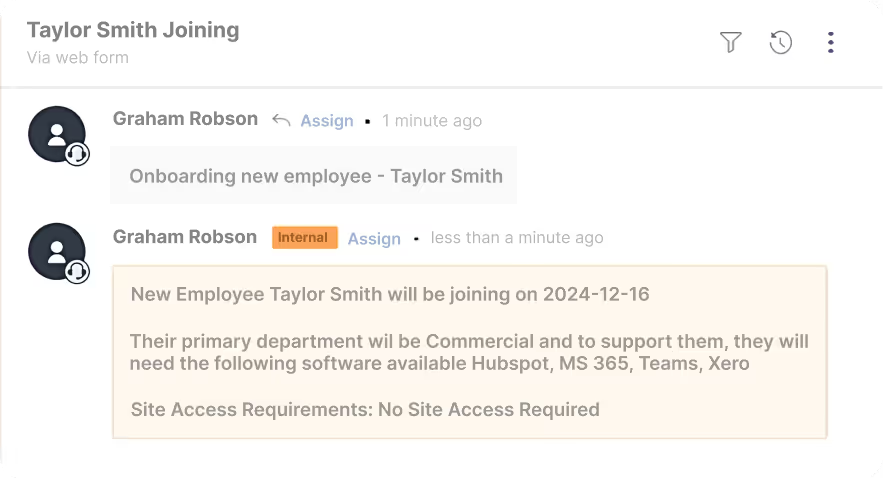
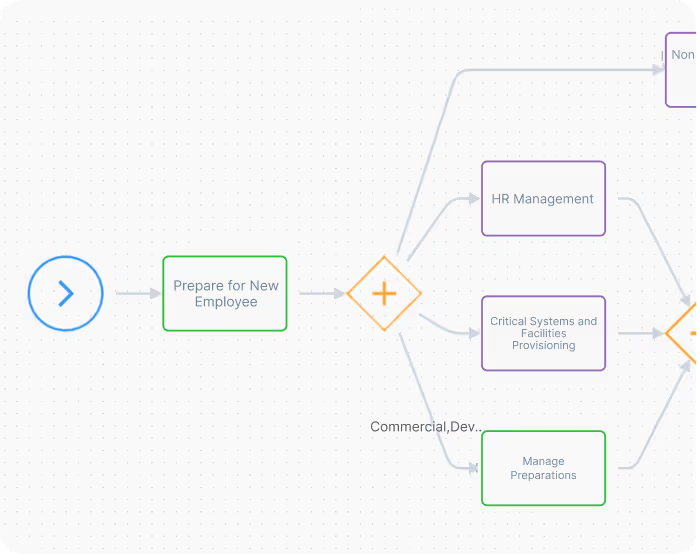
Woman with dark hair in a bun looking to her left behind a laptop in a softly lit workspace.Workflow diagram showing steps from start to preparing new employee, then splitting into parallel activities including HR Management, Critical Systems and Facilities Provisioning, and Manage Preparations, connected by gateways.Employee onboarding app interface showing preparation steps for Taylor Smith with options to update start date or abort onboarding, plus sections for managing related tickets.Chat interface showing onboarding details for new employee Taylor Smith joining on 2024-12-16, assigned to Commercial department with required software Hubspot, MS 365, Teams, Xero, and no site access needed.
What problems can be solved?

AI Suggestions aren't built for Complex Terrain

Copilots excel at simple question-and-answer scenarios. But when workflows get complicated - multiple steps, regulatory requirements, mission-critical accuracy.
Suggestions alone leave too much to chance.
A contour map depicting inconsistency
No map for complex journeys
AI copilots excel at simple question-and-answer scenarios. But when workflows get complicated - multiple steps, regulatory requirements, mission-critical accuracy - suggestions alone leave too much to chance.

A contour map depicting bottlenecks
The execution gap
AI suggests next steps, but agents still interpret, improvise, or forget. When workflows branch based on context, or when compliance checkpoints matter, suggestions can't guarantee the right path.
A contour map depicting compliance threats
One size doesn't fit all workflows
Complex regulated processes fall apart between what AI recommends and what agents actually do. You can't audit suggestions. You can't prove compliance. And you can't scale operations on hope.
The result: Process failures, audit exposure, inconsistent execution, and no way to prove compliance.
When it matters most.
Get in Touch
What's the secret source?

Three Navigation Products. One Goal: Give Agents Better Maps


The Navigation Difference
Think GPS, not textbook. A manual tells you what to do; GPS shows you where to go, adapting to conditions while ensuring you reach your destination. Navigation Maps provide calibrated guidance - structured where precision is required, flexible where human judgment adds value.

Built exclusively for Agent Navigation, embedded directly in Zendesk.

Each product works independently or together to provide complete Agent Navigation with appropriate control.
Book Navigation Demo
White forward arrow symbol between two gray chevrons on teal background.

Flowset™ - Navigation Maps Engine

Transform complex processes into interactive journey maps. Agents follow clearly marked paths with visibility at every decision point - you get predictable, compliant outcomes without rigid constraints. Calibrated for your terrain.
More
Black contour lines depicting topographic elevation on a pale pink background with four cross markers.
Flowset Employee Onboarding form showing fields for employee name, start date, company email, and checkboxes for updating start date or aborting onboarding.Sidebar panel showing four activity boxes labeled Activity, Parallel Activity, Approval, and Verification with enter name fields, a Join Gateway icon with a plus sign, and Start and Stop circular buttons with arrows and check marks.Flowchart segment showing steps to prepare for a new employee, branching into HR Management, Critical Systems and Facilities Provisioning, and Manage Preparations.
Icon with four white arrows pointing outward from a gray X in the center on a teal background.

Formset™ -  Navigation-aware Navigation
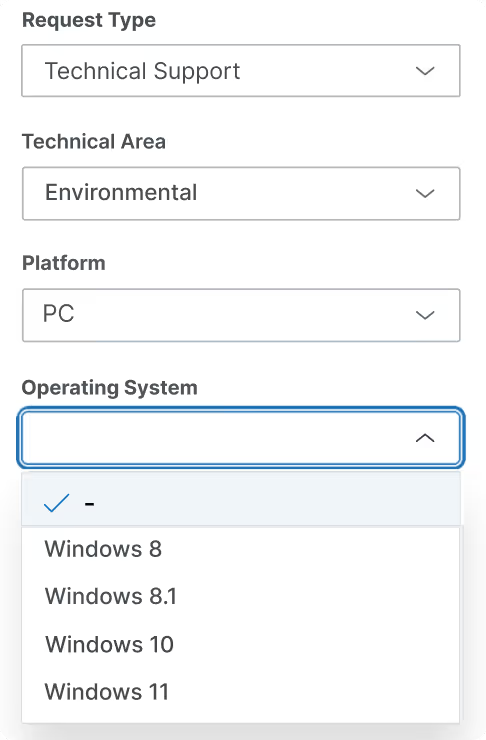
Dynamic forms that adapt based on Navigation Maps, revealing required fields as agents progress through each step. Forms that understand context and enforce what matters.
More
Black contour lines depicting topographic elevation on a pale pink background with four cross markers.
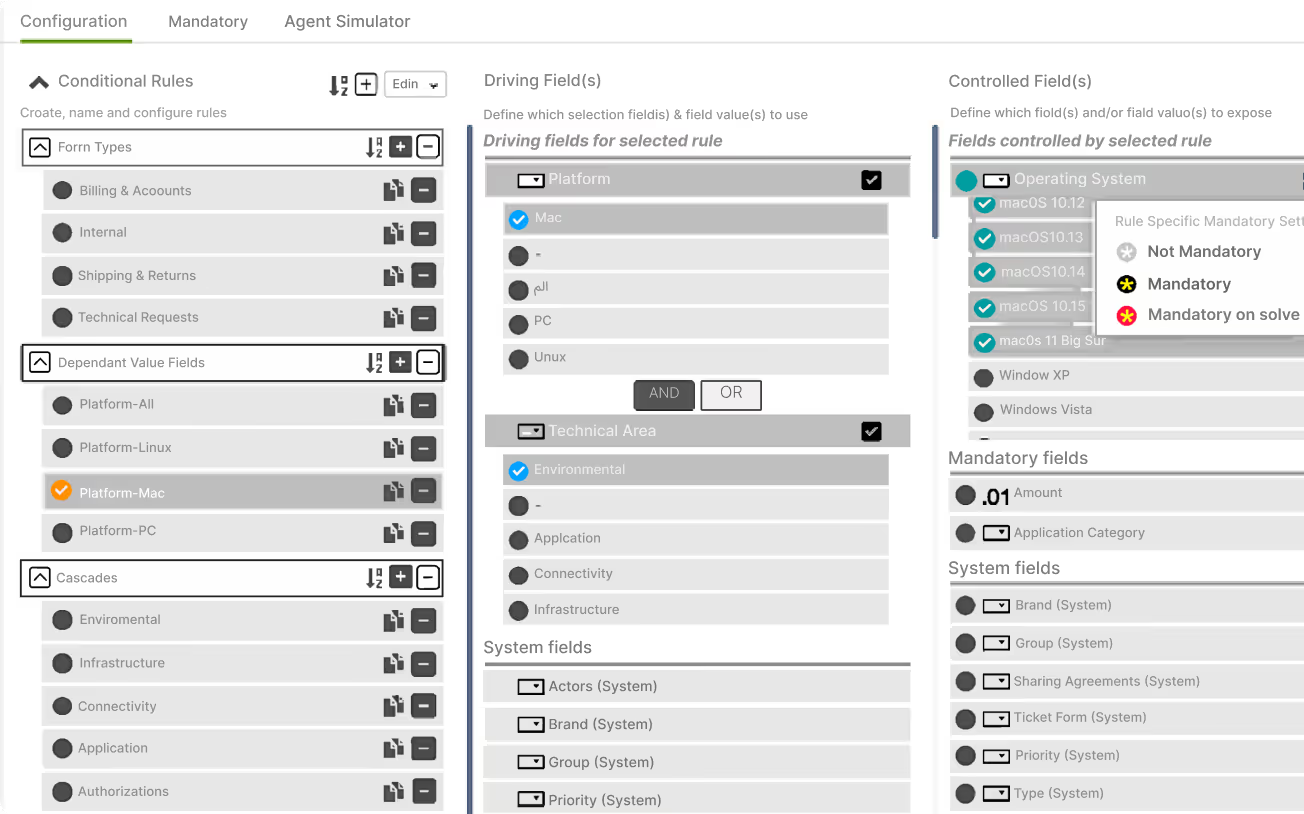
Dropdown menus for request type set to Technical Support, technical area set to Environmental, platform set to PC, and operating system options showing Windows 8, 8.1, 10, and 11.Configuration tab interface displaying conditional rules with sections for Form Types, Dependant Value Fields, Cascades, and columns for Driving Fields and Controlled Fields including options for platform, technical area, and operating system settings.
Three upward-pointing chevrons in dark teal, black, and white on a teal square background.

Performset™ - Navigation-based SLAs

Custom metrics that measure adherence to your Navigation Maps, going far beyond Zendesk's basic tracking to verify process compliance and journey completion.
More
Black contour lines depicting topographic elevation on a pale pink background with four cross markers.
IT service dashboard showing filters for groups, agents, requesters, and organizations on the left, and a list of 60 actionable tickets with subjects, SLA breach times, assignment status, and review states on the right.Performset SLA policy overview showing assign by 19:27 Fri 22 May, respond by 21:22 Fri 22 May, workaround by 1 day 19:32 Tue 26 May, solve by 2 days 22:32 Wed 27 May with options for tools and show measures.
What's oven ready to go now?

Navigation Solution Apps

Don't build Navigation Maps from scratch. Deploy pre-configured navigation for common regulated workflows.

Navigation Solution Apps provide immediate value while retaining full configurability. + Enjoy our easy upgrade path to full Flowset capabilities.

KYC for Zendesk Navigation

Complete customer onboarding Navigation Maps with identity verification checkpoints, Sumsub integration, and automatic compliance reporting.
More
Abstract topographic map background with black contour lines and cross markers on a pale green gradient.
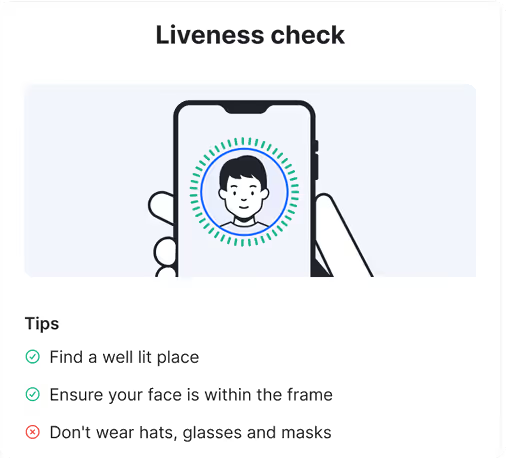
Flowchart illustrating the Know Your Customer process from Customer Identification to Customer Due Diligence, then Enhanced Due Diligence, ending with either Approved or Rejected status.Screenshot of Flowset interface showing 'Identity Verification' with an option selected to add an identity verification link to the ticket, displaying a message 'Identity Verification SUCCESSFUL', and options to handle verification success or failure.Illustration of a hand holding a smartphone with a face scan for a liveness check and tips to find a well-lit place, keep face within frame, and avoid hats, glasses, and masks.

Employee Onboarding Navigation

Multi-step, multi-stakeholder provisioning with document verification workflows calibrated to your compliance standards using Sumsub's services
More
Abstract topographic map background with black contour lines and cross markers on a pale green gradient.
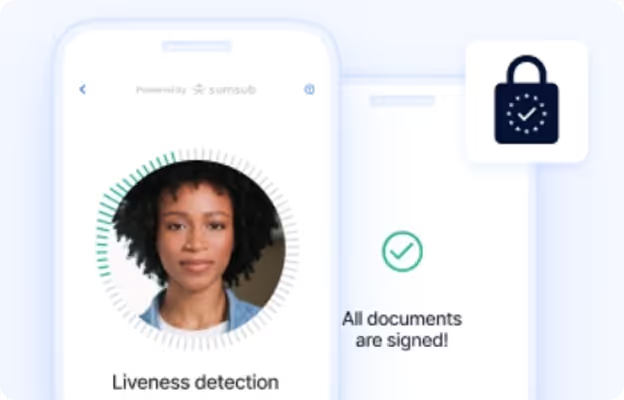
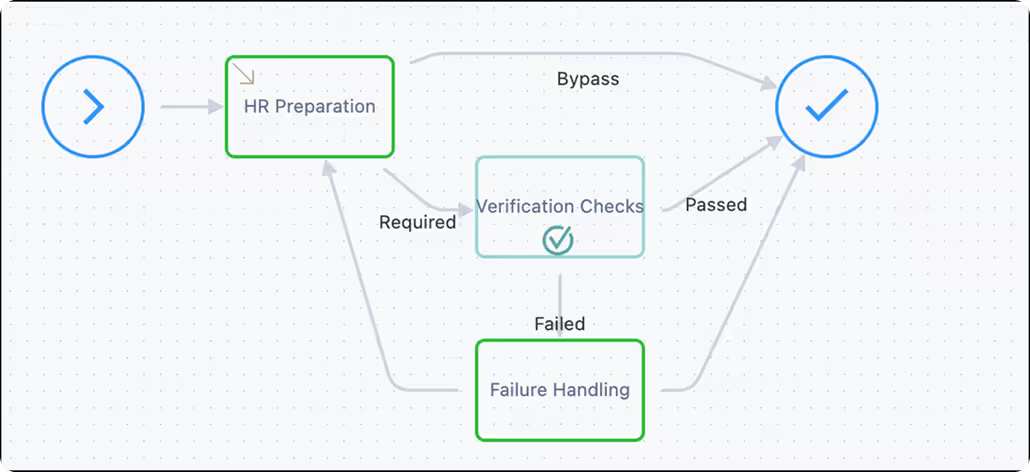
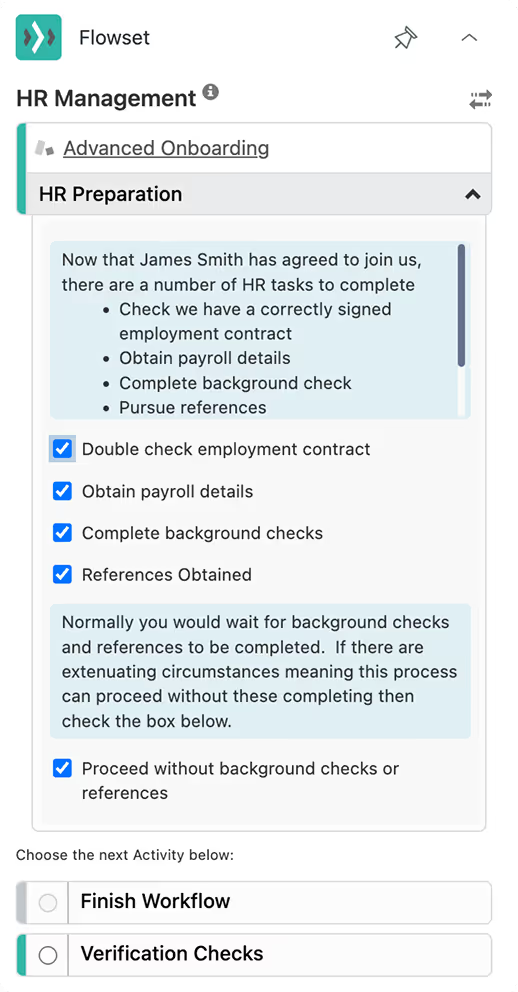
Mobile screen showing liveness detection with a woman's face, a checkmark, and text stating all documents are signed, alongside a lock icon symbolizing security.Flowchart showing HR preparation leading to verification checks, which if required proceed; passed checks and bypass lead to completion, while failed checks go to failure handling then back to HR preparation.HR Management screen showing HR Preparation tasks with checkboxes, including employment contract, payroll details, background checks, references, and option to proceed without background checks or references, plus next activity selection for Workflow or Verification Checks.
Man with curly hair wearing a dark blazer typing on a laptop by a sunlit window.
Compliance Fine shock
*
Reputational damage incalculable
Built for B2B SaaS
*
Enterprise-ready features
Is this for me?

Built for organizations navigating complex terrain

You're the right fit if:
You need reliable compliance, not best-effort suggestions
You have multi-step processes where getting it wrong isn't acceptable
You're in financial services, healthcare, life sciences, technology, telecoms, media or legal industries
Your workflows require audit trails proving every required step was completed
Your team size is 50-500 agents
/ Understanding Agent Guidance

The Right Tool for the Right Terrain

Not all customer service work is the same. The tools should match the complexity:
Narrated Guidance (AI Copilots)
AI suggests next steps based on context. Agents read, interpret, and decide. Excellent for common scenarios, knowledge retrieval, and general productivity.
Tick icon
Best for:
Single-question resolution, well-documented procedures, standard support efficiency
Navigated Guidance (Agent Navigation)
Interactive journey maps provide structured paths through complex processes. Agents can see where they are, where they're going, and what checkpoints matter - while retaining judgment where it adds value.
Tick icon
Essential for:
Multi-step regulated workflows, mission-critical accuracy, processes where you can't afford to get it wrong
The Evolution
Knowledge Bases = Repair Manual
Read instructions, interpret, execute on your own
AI Copilots = Video Tutorial
Watch suggestions, understand, attempt to replicate
Navigation Maps = GPS Journey
Follow turn-by-turn guidance calibrated to your destination and the terrain
For straightforward work, earlier approaches suffice. For complex journeys where precision matters, you need navigation.
What's the cost?

Enterprise navigation without enterprise overhead

Cloudset costs less than dedicated workflow platforms while delivering Agent Navigation capabilities where you need them - within Zendesk, the platform you already use.
Typically only
10-20%
uplift on your Zendesk spend
This multiplies your existing Zendesk investment and costs infinitely less than platform switching.
testimonials

Trusted by companies navigating complex customer terrain

01
We are committed Zendesk users and while the Zendesk platform offers us a great solution, there were gaps identified by our business needs. To address these areas, we learned about Cloudset through Zendesk and installed Formset. It then became foundational to our organization's use of Zendesk. With its features, we're able to create a streamlined experience for our agents and capture the high-quality data we need to improve our business.

Dan Blum - Director of Customer Support
Donors Choose
02
The Flowset app has been an absolute game-changer for us! We have several complex onboarding and support processes that involve multiple agents coordinating multiple activities. Each activity might have prerequisites, might need to be performed in a specific order, or to be efficient, some must be executed in parallel. As advanced users of Zendesk know, implementing complex workflows and keeping track of where you are in the process is not trivial to implement or maintain right out of the box.

Tod Turner's - CEO
Intercept Music
03
We had a business problem, that as we grew as a company to multiple countries in the world, we found ourselves with multiple different SLA’s for our customers over multiple time zones. Performset allowed us to granularly manage the SLA’s down to a client and region setting giving us insights into managing the customers SLA’s with real-time monitoring and alerting. This also allowed us to accurately report on SLA activity for each of our clients.

Bryan Steedman - Dir. of Customer Care
EagleEye
security

We have you covered

Trusted by regulated organizations worldwide
SOC 2 Type II & GDPR Compliant
HTTPS data encryption on transmision and AEG-256 encrption at rest
Official Zendesk Technology Partner (15+ years)
See Cloudset Trust Center
Zendesk partner logo above AICPA SOC and EU GDPR compliant certification seals.

Why not just use [Alternative] for Agent Navigation?

Tree diagram icon
Enterprise Workflow Platforms
Too expensive, too complex, wrong integration model. You need navigation capability within Zendesk, not enterprise overhead requiring platform migration.
Code icon
Custom Development
Months of development, ongoing maintenance costs, no guarantee of navigability or compliance consistency. CloudSet Navigation Maps deliver reliable guidance immediately.
Headphone icon
Basic Zendesk
Great for simple support, insufficient for structured processes requiring audit trails and compliance assurance. Agent Navigation fills the complexity gap.
App window icon
Basic Apps
Good for simple operations, but it falls short when complexity increases and multiple steps are required. One Cloudset App when multiple Apps are too many.
AI robot icon
AI Co-pilots
AI suggests. Navigation guides. When process compliance is mandatory or workflows are genuinely complex, you need structured paths that provide visibility and ensure critical checkpoints - not suggestions that rely entirely on agent follow-through. The right tool for the right job.
Package icon
Another Service Platform
Dramatic with painful switching costs, with a smarter move is by enhancing Zendesk with advanced Cloudset capabilities.
FAQ

Got Questions?
We’ve Got Answers

Find answers to common questions about Cloudet's approach to enhancing Zendesk.
 Do I need to replace Zendesk?

No. Cloudset enhances your existing Zendesk with Agent Navigation. Your data, users, and configuration stay exactly the same.

  How is this different from Zendesk's AI copilot?

AI copilots suggest; Navigation Maps guide. Copilots are excellent for straightforward scenarios where trust and suggestions work well. Navigation is essential for complex, multi-step workflows where you need structure, visibility, and compliance assurance. Many customers use both - copilots for simple cases, Navigation for regulated journeys. The right tool for the right terrain

Won't this make workflows rigid and inflexible?

The opposite. Good navigation is calibrated - structured where precision matters (compliance checkpoints, required data), flexible where human judgment adds value (decision points, contextual actions). We help you design maps that balance control with the expertise your agents bring.

How long does Navigation implementation take?

Most Navigation Maps are live within 2-4 weeks. We handle the technical setup, you focus on defining your navigation paths.

Do I need additional services accounts?

No. Cloudset bundles micro-services into our Navigation solutions. We bill you for usage as part of monthly navigation credits.

Does my customer data leave Zendesk?

No. Cloudset Navigation operates at the metadata level within Zendesk.

What if our needs grow or change?

Our Navigation tools scale with you. Many customers start with basic mapped paths and expand to sophisticated multi-branch navigation as their terrain becomes more complex.

GEt Started

Go beyond AI Suggestions to Calibrated Navigation

Step through stages or jump to where you want to start.

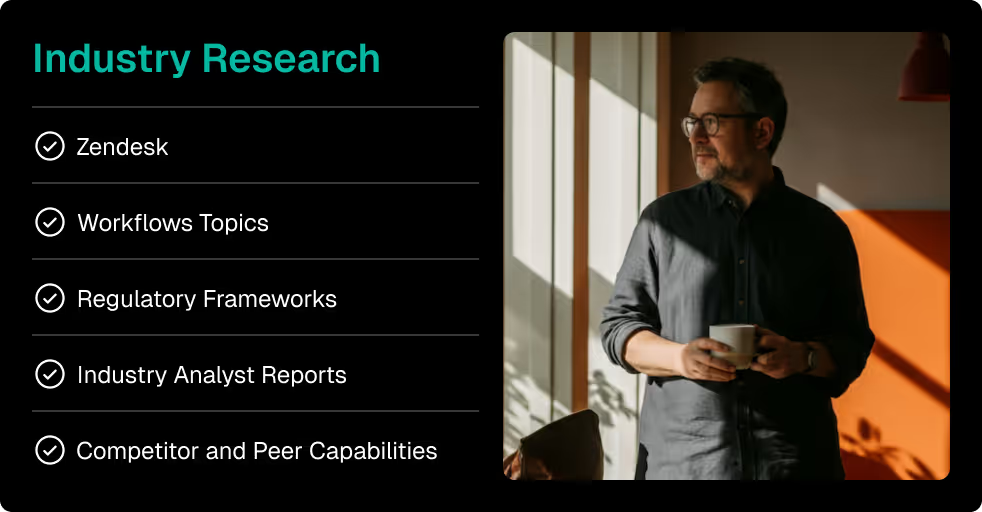
Build your knowledge (Research)

Access comprehensive content about Agent Navigation and how Navigation Maps provide the right guidance for complex terrain.
Resource Section
Black contour lines depicting topographic elevation on a pale pink background with four cross markers.
Cloudset Collateral section with four dark buttons labeled White Papers, Blogs, Case Studies, and Help Articles, each with a corresponding icon.Brand positioning diagram showing a high-end mattress brand positioned on the vertical axis labeled Price (from Low to High) and the horizontal axis labeled Quality (from Low to High), with the mattress brand logo placed in the upper-right corner indicating high price and high quality.Man with glasses holding a cup and looking out a window next to a list titled Industry Research with checkmarked items including Zendesk, Workflows Topics, Regulatory Frameworks, Industry Analyst Reports, and Competitor and Peer Capabilities.

See it navigate (Demo)

Experience how Navigation Maps, adaptive forms, and navigation-based SLAs ensure reliable outcomes through interactive demonstrations.
Book Navigation Demo
Black contour lines depicting topographic elevation on a pale pink background with four cross markers.
Diagram showing the steps of product design from market research and ideation to prototype creation, design specifications, development, and final product release.Green button with a white envelope icon and the word Contact.Green rectangular button with a white website layout icon and the text 'Demo'.White running person icon followed by the word 'Pursue' on a teal rounded rectangle button.

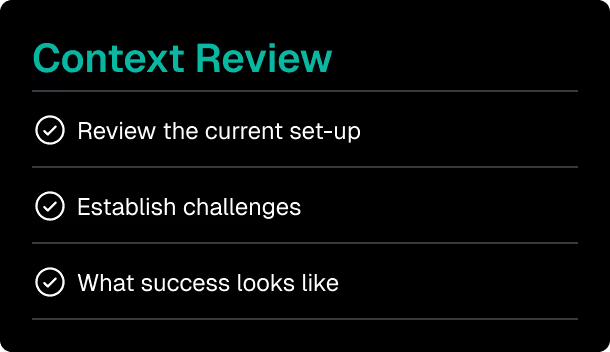
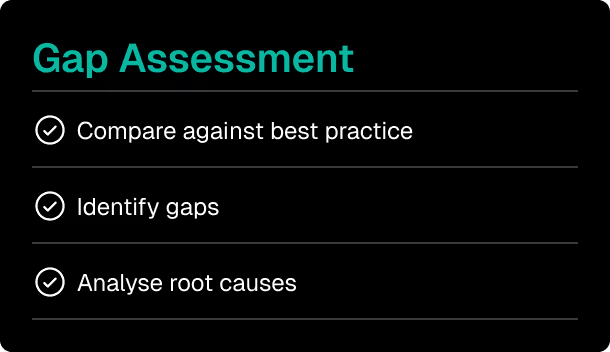
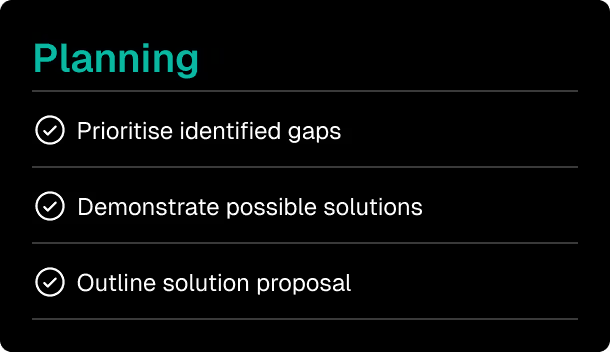
Gap analysis (Assessment)

Schedule a complimentary Navigation assessment of your current Zendesk implementation to identify workflows that need more than AI suggestions.
Request Navigation Assessment
Black contour lines depicting topographic elevation on a pale pink background with four cross markers.
Diagram showing the steps of product design from market research and ideation to prototype creation, design specifications, development, and final product release.Slide titled 'Context Review' with three bullet points: Review the current set-up, Establish challenges, What success looks like.Checklist titled 'Gap Assessment' with three items: Compare against best practice, Identify gaps, and Analyse root causes.Planning slide listing three steps: prioritise identified gaps, demonstrate possible solutions, and outline solution proposal, each with a checkmark icon.

Focused Navigation Implementation (Pilot)

Start with a targeted Navigation Maps implementation on your most critical workflow. See measurable results before full-scale deployment.
Get in Touch
Black contour lines depicting topographic elevation on a pale pink background with four cross markers.
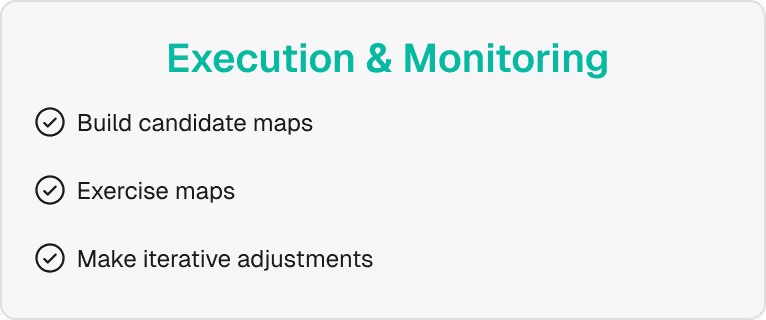
Connection wave dotted line Checklist titled Preparation with three checked items: confirm objectives and scope on identified gaps, select the target group of agents, and familiarise the team.Checklist titled Execution & Monitoring with items: Build candidate maps, Exercise maps, and Make iterative adjustments, each marked with a check icon.Checklist titled Evolution & Scaling with three tasks: Analyse pilot outcomes, Gather feedback for refinements, Develop a roadmap for scaling.
Leading Agent Navigation on Zendesk since 2009.