Performset badge
/  Performset

SLA Engineering: Keeping your Promises 

Custom SLA metrics with increased operational guidance
Two men collaborating while looking at a laptop in a modern workspace.
Black contour lines depicting topographic elevation on a pale pink background with four cross markers.
IT service dashboard showing filters for groups, agents, requesters, and organizations on the left, and a list of 60 actionable tickets with subjects, SLA breach times, assignment status, and review states on the right.Performset SLA policy overview showing assign by 19:27 Fri 22 May, respond by 21:22 Fri 22 May, workaround by 1 day 19:32 Tue 26 May, solve by 2 days 22:32 Wed 27 May with options for tools and show measures.
Give your agents hard targets and context that enforce compliance and drive results
/ Feature

Operational SLA Navigation

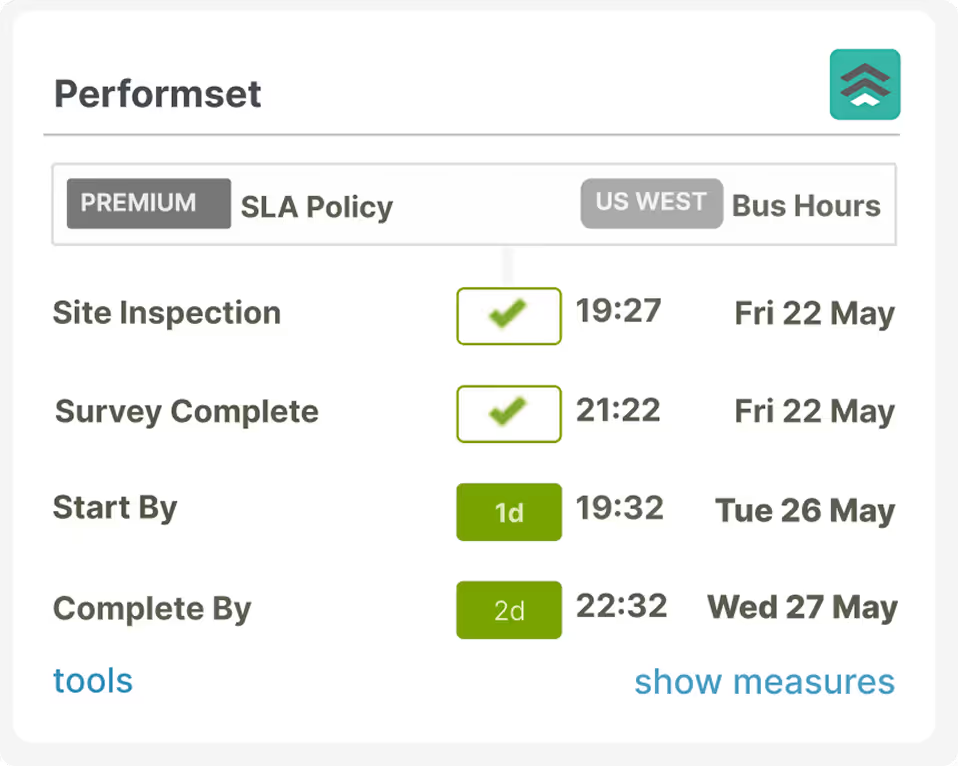
For frontline agents, navigation is contextual. When they process a ticket, they see the complete performance picture: metric targets, current results, and status at a glance. Are we on track or slipping? Do we need to recover or maintain momentum?

Every ticket surfaces:
Applicable SLA policy with customer region and timezone
Target timescales and real-time performance tracking
Drill-down SLA analytics directly in-ticket
Get in Touch
Black contour lines depicting topographic elevation on a pale pink background with four cross markers.
Performset SLA policy timeline displaying assign by, respond by, workaround by, and solve by deadlines with dates and times, plus status checkmarks and remaining hours.
/ Feature

SLA Management Navigation

For agents, managers, and process owners, SLA Navigation Dashboards deliver the big picture. Extract maximum value from your SLA data with aggregate views that enable smart queue management and reveal total performance at a glance. Prioritize tickets, mitigate delays, and maintain balance across operations.

Choose your view:
Traditional sortable table or metric-focused layouts
Configured segment filters and bookmarks (global or group-level)
Dynamic faceted filtering for precision targeting
Get in Touch
Black contour lines depicting topographic elevation on a pale pink background with four cross markers.
Dashboard interface showing a ticket management system with filters for groups, agents, requesters, and organizations on the left and a list of tickets with subjects, SLA breach times, and review assignments on the right.
/ Feature

SLA Impact Navigation

For managers and process owners, SLA Impact Reporting transforms SLA data into actionable intelligence. Understand performance commitments in precise detail and leverage SLA metrics as the foundation for customer-centricity and agent excellence.

Access insights through:
Long-term reporting via BI tool integration with specification and results data pushed to tickets
Built-in short-term reporting with best-practice templates using Dashboard viewpoints and filters
Pass/Fail and Fulfilment measurements for granular analysis
Get in Touch
Black contour lines depicting topographic elevation on a pale pink background with four cross markers.
Dashboard interface of Performset SLA Assistant showing ticket performance reports with charts for agent, organization, group, metrics, overall, and priority performance aggregates and filters on the left side.
/ Feature

Design & Configuration

While native Zendesk metrics handle most use cases, Performset delivers unlimited configurability for standard and custom metrics. Combine expert consulting with no-code configuration - all within Zendesk’s native environment.
Start, pause, restart, and stop based on any ticket change
Retain full Zendesk capabilities while adding complex behaviours and metric types
Support advanced priority matrices beyond standard four-level structures
Get in Touch
Black contour lines depicting topographic elevation on a pale pink background with four cross markers.
Performset SLA Assistant interface showing Configure tab selected with menu options including Administration, Account, Global, Events, Business Hours, Holidays, Regions, Policies, Dashboard, and Reporting. Policies tab is highlighted with a description below.Configuration panel showing metric label 'Workaround by' and a dropdown for selecting Type with options Not Applicable, Duration Based, Measure Only, and End Of Day for different severity levels along with input fields for hours, minutes, warnings, and business hours.
What CAN IT DO?

Common SLA Use Cases

Here are some examples of where Performset has be applied to go well beyond native Zendesk SLA Management.

Tiered Escalation

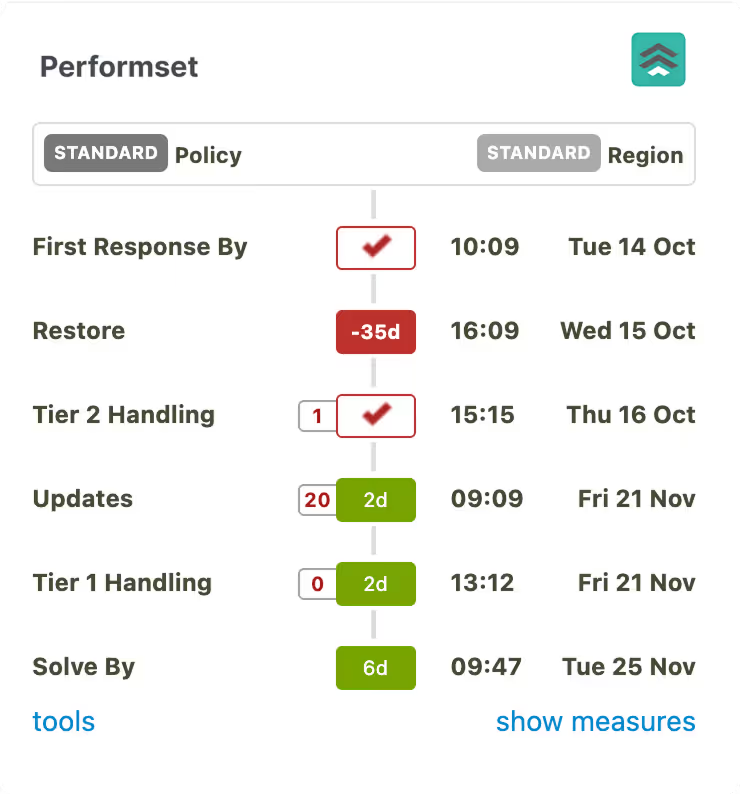
L1 > L2 > L3. Managing accountability across tiers. Team-reliant performance demands clear accountability at every level. Bottlenecks at any tier create pressure across the chain - or worse, breach customer commitments entirely.
  • Set internal standards for responsiveness at each tier level
  • Track and measure individual and aggregated bottleneck patterns
  • Count cycles of escalations between levels and cycles of updates to the requester, including how many occurred within SLA and not within SLA.
More
Black contour lines depicting topographic elevation on a pale pink background with four cross markers.
Performset timeline table showing policy status and region with dates and times for first response, restore, tier 2 handling, updates, tier 1 handling, and solve by stages.

Allocation & Acceptance

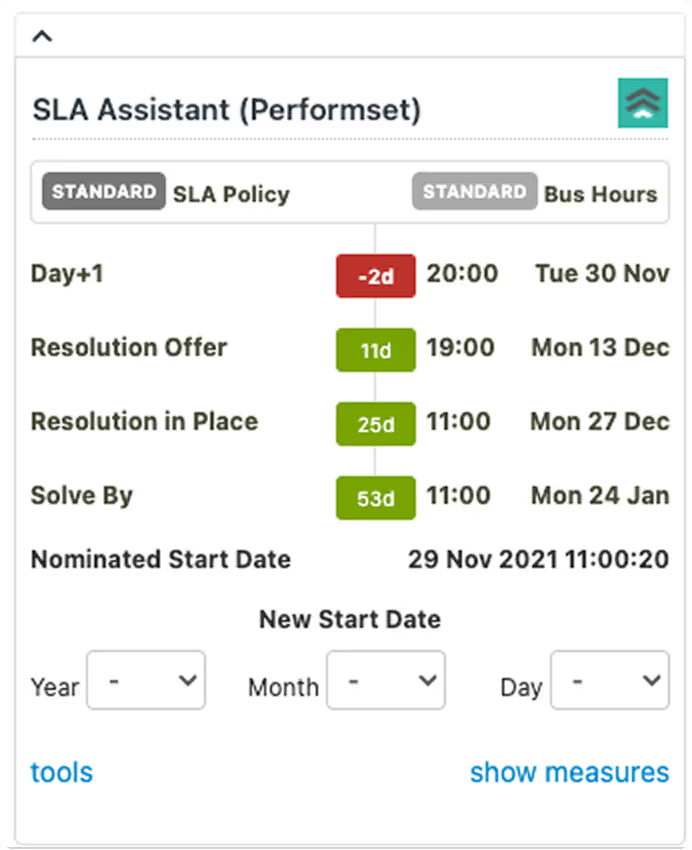
Initial Actioning - initial phase accountability. Getting from new to interactive engagement is critical. While seemingly covered by a First Response metric, what if you have an agent allocation process that involves group assignment first, followed by allocation, or establishing clarity before a credible promise is made?
  • Custom metric to set, track, and report agent allocations
  • Custom metric to commence an SLA on acceptance, not when the ticket was created
  • Backdate the commencement of an SLA if initially received outside of the system or reallocated as an SLA tracked ticket.
More
Black contour lines depicting topographic elevation on a pale pink background with four cross markers.
SLA Assistant (Performset) interface displaying standard SLA policy and bus hours with dates and times for Day+1, Resolution Offer, Resolution in Place, and Solve By milestones, plus fields to set a new start date by year, month, and day.

Interim Progress

Next best efforts - useful checkpoints. While resolution is the goal, the process may take some time to achieve. Smart interim updates and workarounds can do wonders in keeping customers informed and returning to a level of operation.
  • Updates cycles that are not tied to ticket status to ensure regular, come-what-may updates and resolutions SLAs that carry on after the initial ticket is solved.
  • Set, track, and measure workaround solutions ahead of full resolution, especially relevant to longer software bug resolutions.
  • Proactive SLA’s that can be redacted if they are subsequently determined to be not applicable.
More
Black contour lines depicting topographic elevation on a pale pink background with four cross markers.
Performset SLA policy and business hours summary showing site inspection and survey complete with times on Fri 22 May, start by Tue 26 May, and complete by Wed 27 May.
A woman looking satisfied with the results
/ metrics

Achievable SLA Impacts

Expect to achieve a measurable, focused set of business and customer impacts.
+25%
Improvement in CSAT // NPS // Brand perception due to timely responses
-80%
Breach fines due to high visibility and real-time pre-breach warning.
-20%
A decrease in operational costs - optimal ticket processing that avoids unnecessary touches.
/ testimonials

B2B & B2C teams love using Performset - it Shows

/ 01
We had a business problem, that as we grew as a company to multiple countries in the world, we found ourselves with multiple different SLA’s for our customers over multiple time zones. 

Performset allowed us to granularly manage the SLA’s down to a client and region setting giving us insights into managing the customers SLA’s with real-time monitoring and alerting.
Image of Bryan Steedman
Bryan Steedman
Director of Customer Care
Eagle Eye
/ 02
We are big fans of making life easier for the agents so they can focus on more supporting customers and strategic areas initiatives.

Using Performset & Formset from Cloudset helped make this happen. Everything happens behind the scenes, showing only what's relevant, which makes it easier for agents.
Image of John Tieu
John Tieu
Information Architect Manager
Mediaocean
/ 03
Delivering a superior customer experience is a core value at ABBYY.

Improving our overall ticket resolution time by focusing more on the intermediary response timers helps us effectively meet SLAs and achieve customer excellence standards.

The support from Cloudset has been amazing, and we would definitely recommend Performset.
Young man with short dark hair and beard wearing a dark suit, white shirt, and navy tie with a neutral gray background.
Viacheslav Prodan
Senior Director of Systems, Processes & Automations
ABBYY
/ 04
Flowis helped us go from scattered spreadsheets to a clean, centralized sales process. Our reps adopted it in days—no training, no pushback.
B2B SaaS software Webflow template avatar4
Leah Torres
Sales Director, BrightLedger
/ 05
With Flowis, we finally have a CRM that supports how we sell—not the other way around. Forecasting and reporting are now instant and accurate.
B2B SaaS software Webflow template avatar5
Greg Sumner
CRO, NovaStack
/ pricing

Reassuringly High-value

Time is money and reputation.
Per agent // per month // annual commit
$20
All agents, excluding light agents
Plus comprehensive onboarding consultancy.
/ FAQ

Everything you need
to know - Upfront

From setup to support and pricing, here are quick answers to the most common questions we get from teams considering Performset
What is covered by onboarding, and why do I need it?

Onboarding is mandatory due to our direct involvement, which is necessary to ensure a successful implementation and ongoing change management.

SLA // OLA Management is an in-depth subject area. Typically, customers come to us where the native capabilities of Zendesk’s native SLA Management are not sufficient to meet their needs.

We provide best-practice advice on policy design and how it can be integrated into your ticket management processes.

The onboard fee is independent of scope and includes consultation related to your specification, direct set-up by a Cloudset consultant, handover, testing support, and bedding-in changes.

What ongoing support is provided?

In addition to reactive support, regular proactive customer success calls will ensure that your SLAs // OLAs continue to meet your needs. Should you require changes or new custom metrics, these will generally be provided at no additional charges

How long does implementation take?

We advise allowing 4 weeks to cover mobilisation, kick-off, candidate configuration, handover, testing and operational launch.

Internal roll-out standards may require agent orientation. In such cases, Cloudset will provide informal train-the-trainer training level support to Zendesk admins.

Why are all agents required to be licensed?

Cloudset follows the general Zendesk premise that your agent count determines the value to your organization. Specifically, agents who resolve tickets. As such, light agents are not counted.

Performset also has to process all tickets in Zendesk to determine if and when tickets go under SLA Management. This can occur at any time during a ticket's lifecycle, such as when it is escalated or transferred.

Is the relationship between native Zendesk and Performset SLA Management?

No. Performset is a complete wholesale replacement for Zendesk SLA Management.

/ Get Started

SLA Engineering:
Keeping your Promises

with Performset for navigatable Custom SLA metrics

Contact us to discuss.
Topographic contour map pattern